
Common Issues
Air is entering the pump – Check suction lines to make sure all connections are tight. Check level of chemical tank. Remove obstructions and clean strainers
Pump is not accurate – Check and clean ball checks. Clean strainer and check for obstructions in suction lines, discharge lines, and injectors. Check discharge and ensure some back-pressure is present.
The Display reads “FvS” – The flow Verification System has trigger. Solution flow may not be present in the system. Check signal from flow sensor. If no flow sensor is connected, disable FVS function to prevent false triggering.
The Display reads “SIG” or “SBY” – This indicated the pump is ready and waiting for a remote signal from PLC or other control system. This normal. If the pump is not connected to a remote signal circuit, disable this function.
Solution is leaking from the top or bottom fittings/connectors – Check to ensure o-rings are present and seated properly. Check tubing connections and tighten as necessary. Check to make sure ball checks are installed properly.
Electricals
The CD1 will not power up – Check power source or try a different power source. Check to ensure the power cable is properly inserted in the bottom receptacle of the pump.
The Remote Start/Stop is turning on/off or chattering – Check M12 cables integrity and proper connection to pump. Check that all signal cables are shielded and properly grounded. Ensure signal wiring is not located or run next to high voltage power or equipment generating EMI. Ensure power wiring to the pump is clean/conditioned.
The 4-20mA signal is dropping or incorrect – Check M12 cables integrity and proper connection to pump. Ensure 4-20mA signal is powered via 15-24VDC. Check that all signal cables are shielded and properly grounded. Ensure signal wiring is not located or run next to high voltage power or equipment generating EMI. Ensure power wiring to the pump is clean/conditioned.
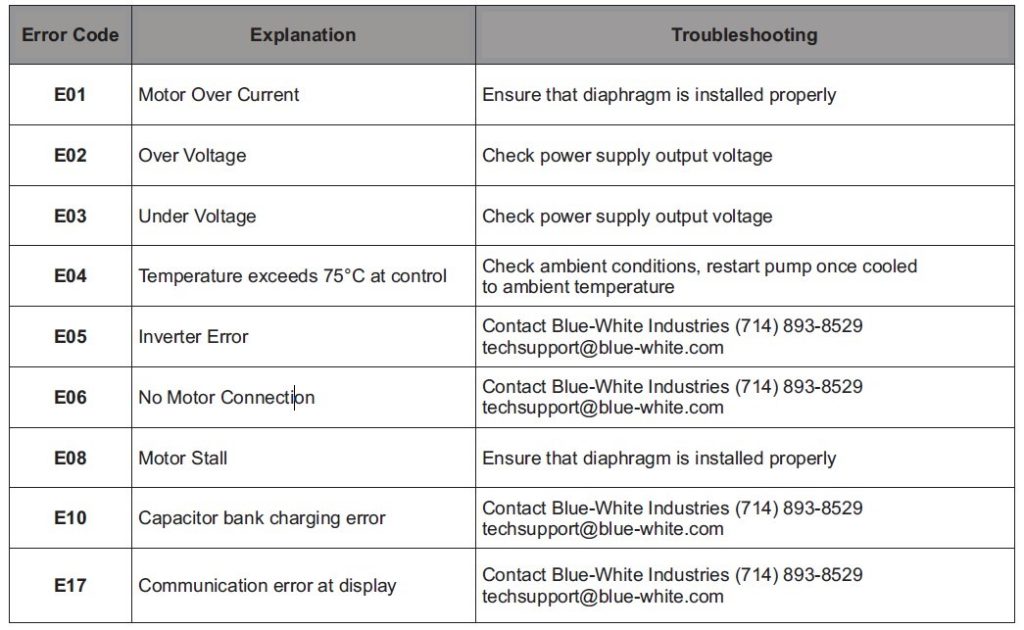
The Display reads “E04” or other error code – See the below chart and contact factory for assistance. Some error codes are corrected with a current Firmware Update. See System section for details on firmware updates.